
Local Tickets
conceptual design for local event ticketing app
Role
Responsible for end to end design contributions, information architecture usability testing and brand presentation on a 3 member team.
Tools
Timeline
Figma, Figjam, & Photoshop
3 weeks


Overview
Local Tickets is a local partner network for venues that work together to promote and sell event tickets in the Denver, Colorado area. The app was designed as a response to the friction and impersonality of large-scale platforms like Ticketmaster, offering a more community-focused alternative for a smaller, local audience. Users can search for events, discover what's trending through a social feed, purchase tickets, and access them easily, even when offline at a venue. The goal was to create an experience that feels personal and hyper-local, fostering genuine community engagement rather than just transactional ticket buying.
Research & Discovery
Our Task
Build a ticketing app that will sell all of the event tickets, manage them, and provide scannable QR codes that can be presented at entry and even offline. They hope to hyper-localize their offerings, while fixing the mistakes TicketMaster has made.
How might we make event exploration and ticket buying seamless and easy so the event-goer feel confident using the tool?
How might we make ticket tracking easy, so users can quickly pull up tickets when entering an event?
How might we allow users to connect and form groups for events?
Measures of Success
-
Promotes and sells tickets for events within a local area
-
Fosters a sense of community by recommending events based on users’ existing social circles
-
Provides scannable QR codes that can easily be presented at entry
-
Completed a feature inventory and learned about event information, discovery tools and the ticket purchasing process.
-
Completed a direct competitor research study and evaluated successful usability patterns and feature gaps to inform design decisions.
-
Interviewed 5 concert-goers who attend at least a few shoes a year and would like to increase that, but find multiple major pain points in the current process of buying and tracking tickets for shows.
Research Methods
Competitor Insights
-
Aesthetically-pleasing website; easy to navigate
-
Focused on concerts, comedy and parties; excludes sporting events
-
Ability to connects to apps like Spotify and Apple Music to get personalized recommendations
-
Numerous filter options
-
Partnered with local venues
-
Account creation required to buy tickets
-
Local to Colorado
-
Includes over 9 different types of events
-
Includes free events
-
3rd party site; takes the user to other ticket buying websites to make purchase
-
No account required, only if redirected to another site that requires one
-
Search feature felt dated and confusing
-
Several types of events included
-
Large scale of events to choose from
-
"Favorites" tab for events that users want to decide on later
-
Ability to search by event type or city
-
Account creation
StubHub
DICE
PeakRadar
TicketMaster
-
Dynamic pricing model causes ticket prices to skyrocket early on in ticket sales
-
Until recently, ticket prices wouldn’t accurately reflect what you end up paying after tax and fees.
-
Bad customer service/refund timeline, people end up waiting months on refunds
-
Ticket resale seems complicated or even impossible for users, as well as users not getting their payout for ticket re-sale in a timely matter
-
Overall lack of ticket information transparency
-
Account log-in issues and account ticket tracking issues
-
They try to ban bot accounts from scalping tickets but end up banning real human users instead and still have a problem with bot accounts.
Competitor Feature Inventory Study
StubHub
DICE
PeakRadar
TicketMaster
Event Discovery
Event Information
Ticket Purchasing
Filter Options
Trending or Featured Events
Venue Details (Parking Info, Accessibility, etc.)
Visual Seating Chart/View Photo
Account/Membership
In-App Ticket Storage
Yes
Yes
Yes
Yes
Yes
Yes
Yes
Yes
Yes
No
- only venue location shown
Yes
- includes accessibility information button
Yes
Yes
No
Yes
No
- redirects to venue's website, usually missing visual
Yes
Yes
Yes
No
- redirects to venue's website, usually missing visual
Yes
- 'Orders' page to find
tickets by type
Yes
No
- after purchasing directly from venue's website, tickets are emailed
Yes
Research Synthesis
Interviewing Users
Five avid concert-goers were interviewed. After organizing our responses and feedback, we analyzed the findings through affinity mapping. We found several trends within the answers given in the interviews.
.png)
Main Takeaways
Interviewing users uncovered 3 major pain points in their current process of buying event tickets and needs in a new app: personalized event recommendations, ticket price transparency and tracking/security of tickets.
Understanding the User
Meet Rowan

27• Denver, CO • Frequent concert-goer
Goals
-
Personalized show recommendations
-
Complete fee transparency prior to purchase
-
Easily to track and view tickets
-
Easily access event and venue information
-
Receive reminders for upcoming shows
Frustrations
-
Difficulty pulling up tickets when at a venue
-
Lack of clear filtering options for finding shows
-
Lack of information about seat quality shown prior to purchasing
Defining & Organizing Content
Task Flow
The flow below traces a single user's path through the app: finding an event that excites them, picking the right seat, purchasing with confidence, and easily finding their ticket when they need it.

User Flow
Beyond this primary path, the user flow captured the more exploratory behaviors people bring to the app, including browsing recommendations, favoriting shows, revisiting tickets, and sharing with friends. Mapping these out alongside the core flow let us incorporate in social and discovery features without adding friction to checkout.

Sitemap
The sitemap is organized into 5 primary categories that display clear hierarchy. The main goal is to streamline finding and purchasing tickets while still promoting the social community side of the app.

MoSCoW Method - Prioritization Planning
Must have:
- Easy ticket access in app + add to apple wallet
- Social feed, sharing events
- Recommended events
- Featured events
- Ability to follow users/artists/etc.
Could have:
- Map feature to show locations
- One feed for suggestions based on following/upcoming soon/just added/etc.
- Forming groups with other users
- Timer for tickets being held until purchase
- Ability to share attendance with public or not
Should have:
- Easy seat selection
- Easy to navigate dates
- Navigate past events attended/previous tickets
- Idea of seat quality (image ‘view from seat’ idea probably)
Won’t have:
- Social features like adding comments or liking
Visualizing Layout Ideas
Key Screen Sketches
As a group, we concluded that the Event Recommendation pages, Ticket Buying/Viewing/Tracking pages and Social Feed pages were the largest points of decision-making for the user within the app. Below are our sketches showing ideas for these pages. Once we collaborated and discussed as a team, we moved forward with components of the most successful options.

Solidifying Layout and Structure
Low Fidelity Wireframes
After working through several options for each page, our team focused on building out the frames in figma to map out our structure and flow before layering in the visual design system. This stage establish a clearer structure across the app's core screens and categories.

Home
Search
Finding an Event
Social
Buying & Receiving Ticket(s)
Key Categories at a Glance
A Closer Look
Homepage

Searching for Events

_edited.png)


Social Engagement


Personal Account

Ticket Exploration & Purchase


Clear Ticket Storage


Validating Design Decisions
Usability Testing
I tested 4 users total, starting from the homepage and moving through to a purchased ticket

Feedback and Takeaways
-
Back button requested for when pulling up ticket from My Tickets tab
-
Fixed issue of back button on Artist’s Page leading to search results instead of social feed
Overall users appreciated the social feed and the ease of pulling up tickets that have been previously purchased
Bringing the Design to Life
Design System
To support a confident decision-making process, the main color palette was built around a sense of calm. The blue and green hues create a sense of ease on screens with several images and a lot of information to take in. The typefaces were selected as highly-legible to ensure clarity and readability across screen.

Applied Design
Clear Selection of Recommendations

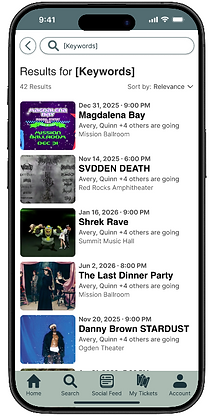
Multiple Filtering Options & Clear Display of Results

Straightforward Social Page with Added Recommendations

Customizable Account Page

Easy Access to Past & Upcoming Tickets

Easily Add to Apple Wallet or Transfer to Another User

Conclusion & Next Steps
The core priority of Local Tickets was to create a community-centered space for concertgoers and ease the stress and uncertainty that typically accompanies buying tickets. User interviews and usability testing helped our team prioritize what mattered most to users, allowing us to improve on where competitors fell short. From the information architecture to the style guide, Local Tickets creates a calming experience in place of the industry's usual stress. In the next phase, we'd focus on building out ticket price transparency and seat-view previews, as well as expanding the range of venues, show types, and artists on the platform.


